Cline is a powerful VS Code plugin that allows you to use AI models directly in the editor for code generation, file operations, and more. It not only accelerates workflows but also provides contextual understanding and intelligent suggestions for complex tasks.
Cline becomes even more powerful with Coding Plan, delivering more usage at lower cost, helping you handle code generation, file management, and multimodal interactions easily.
When using Coding Plan, you need to configure the Coding API instead of the General API
Step 1: Install Cline Plugin
1. Open Extensions Marketplace
- Open VS Code
- Click the Extensions Marketplace icon on the left
- Enter
cline in the search box
- Find the
Cline extension
2. Install Plugin
- Click the
Install button to install
- After installation, choose to trust the developer
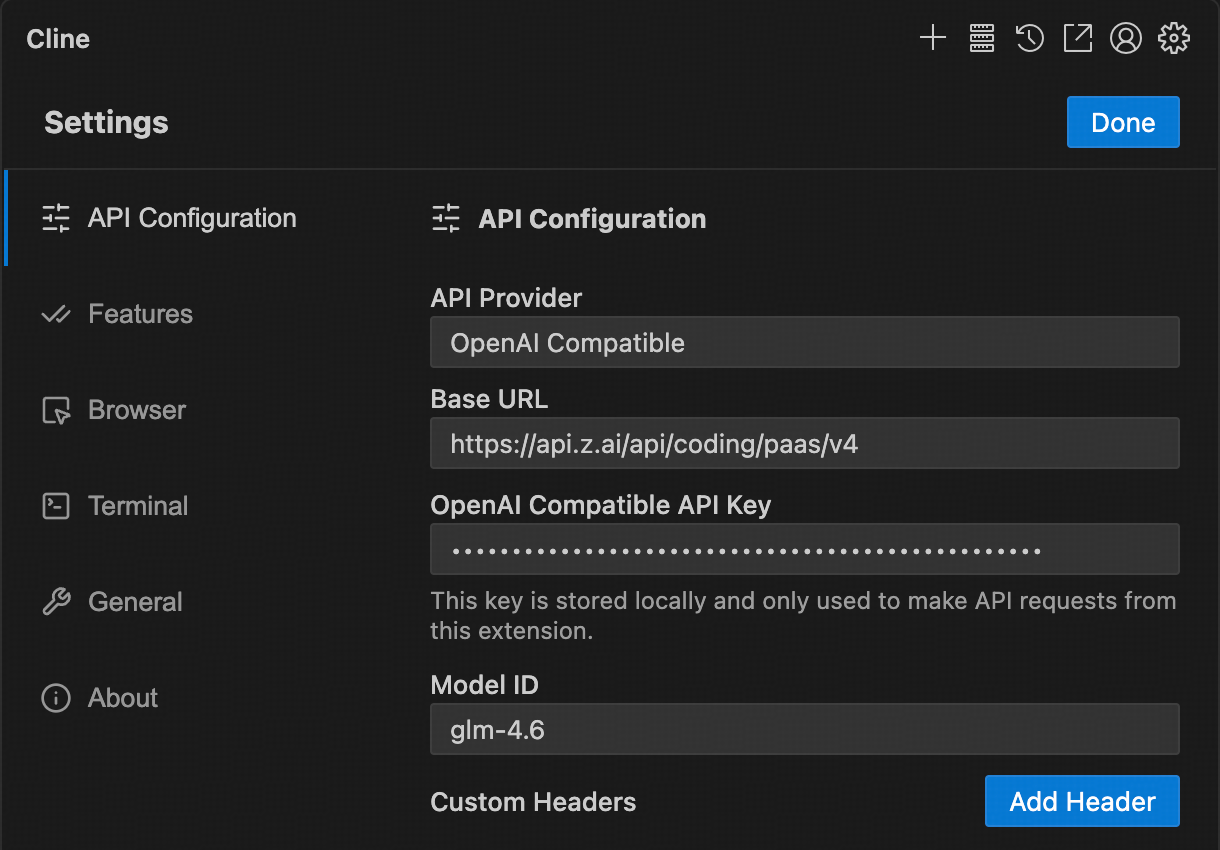
1. Select API Key Method
Select Use your own API Key
Fill in the information according to the following settings:
- API Provider: Select
Anthropic
- Base URL: Enter
- API Key: Enter your VibeCodeCheap API Key
- Model: Select “Use custom” and enter the model name (e.g.,
claude-opus-4-5-20251101). See Models for all available models.
- Other configurations:
- Adjust Context Window Size to
204800
- Adjust
temperature and other params as required by your task
Step 3: Start Using
After configuration, you can enter requests in the input box to have the model assist with tasks such as:
- Creating and editing files
- Generating code
- Refactoring code
- Explaining code logic
- Debugging issues